Track Retro Action Items Across Sprints (No New Tool)
Up to 80% of retro action items never get done–not because your team is lazy, but because your system is broken. Here"s how to actually follow through, with hands-on setups for teams of any size, using tools you already have.
Georg Singer··14 min read
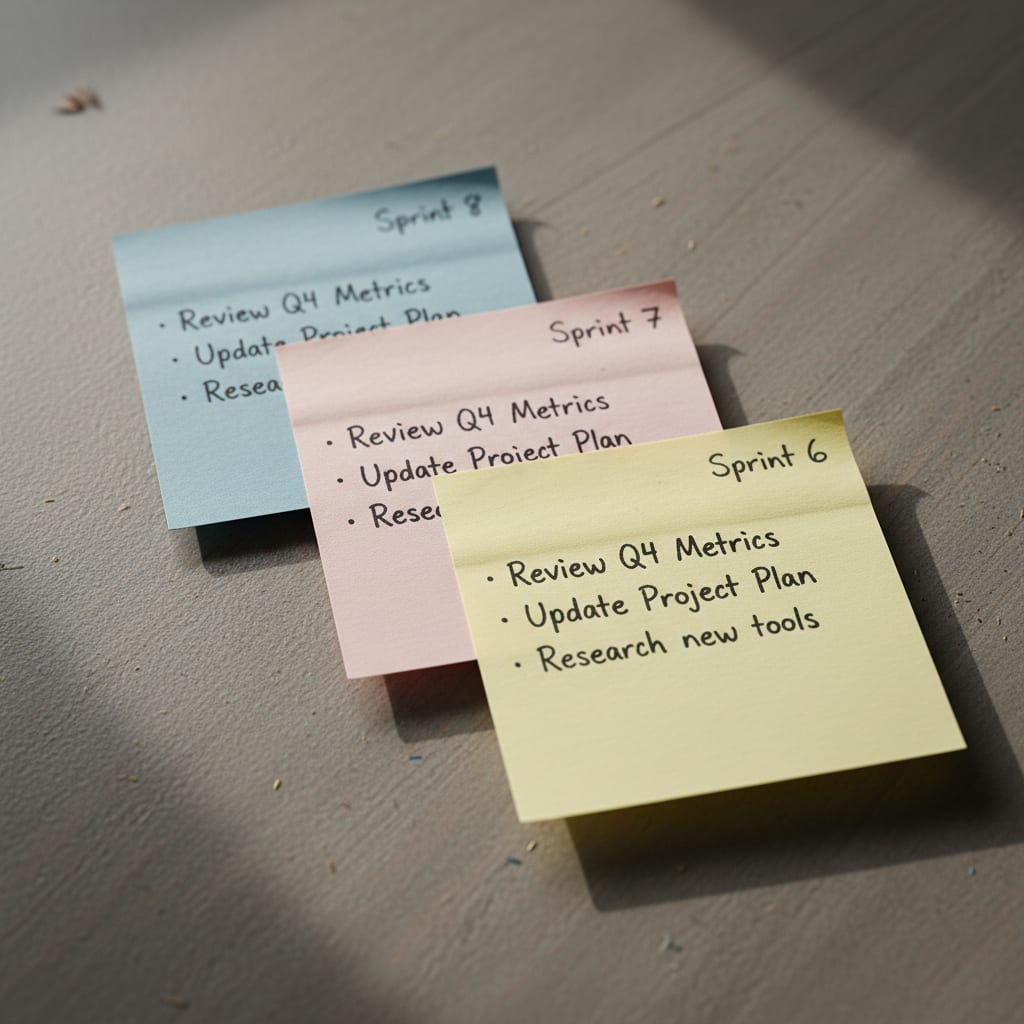
Ever had déjà vu reading your retro board? You"re not imagining it.
You open up the Trello board labeled "Sprint 47 Retrospective." Underneath, there"s Sprint 46. Then 45. Dig deeper and you"ll find, buried in Sprint 31, a card: "Improve deployment process." The same improvement someone stuck on a Post-it just last week.
Here"s the kicker: 70–80% of all retro action items never get completed. That"s not a typo–it"s straight from dejanmajkic.substack.com (2023). And it"s not because your team lacks discipline. It"s a structural failure.
This guide gives you three practical tracking setups–one for teams under 5, one for 5–15, and one for bigger groups. By the end, you"ll know exactly how to ensure your retro action items survive the sprint shuffle, with zero new tools to juggle.
Quick Takeaways:
- 70–80% of retro action items die on the vine–blame broken systems, not lazy teams (dejanmajkic.substack.com, 2023).
- Setup A (<5 people): Notion database tracks items and sprints.
- Setup B (5–15 people, Jira): Use
retro-actionlabel, JQL dashboard, and swimlanes. - Setup C (15+): Ongoing "Team Health" epic per team, rotated quarterly.
- Target: Over 60% completion rate–aiming for 100% means you"re gaming the system, not learning.
Why Retro Action Items Die: The Structure Trap
Let"s get brutally honest: Most retro action items are doomed before you even assign them.
Why? Because your retro board is a graveyard, not a workflow. Trello, for example, doesn"t connect your sprints–each retro board lives in splendid isolation. If an action item isn"t done in Sprint 47, it doesn"t magically show up in Sprint 48 unless someone manually copies it over. That happens for about three sprints, then people just... stop.
The real problem? Action items get treated as "notes," not real tasks. No owner, no deadline, no sprint context. At best, they"re memory aids. At worst, they spread accountability so thin that nothing gets done.
Think about it: How often do you actually review old Trello boards? Does anyone track the velocity of your retro items? Is your sprint review just a calendar event that ends when time"s up, with no numbers or follow-up? If you recognize this, you"re not alone.
Here"s the bigger context: According to the Asana Anatomy of Work Index (2024), knowledge workers spend 60% of their time on "work about work"–status updates, switching apps, duplicating efforts. That leaves just 27% for work that moves the needle. Retro boards you never revisit and numberless sprint reviews? They"re part of that problem.
How do you know if your retro tracking system is broken?
Ask yourself this: How many action items from Sprint N-3 actually got done? If nobody in your retro can answer that–without scrambling to open boards or take wild guesses–your system is broken. Not your team. That"s the fastest test you can run today.
Now, if you"re guilty of this, you"re in good company–but the fix isn"t to "try harder." It"s to change the system.
Before You Choose a Setup: The Three Mistakes Everyone Makes
Ready for some tough love? Most teams sabotage their retro action items in one (or more) of these ways:
Mistake #1: Leaving Action Items in the Retro Tool
EasyRetro, TeamRetro, Retrium–great platforms for running the meeting. But if you leave action items there, they stay stuck in a silo. No workflow, no ticket, no owner waking up to a reminder. No wonder nothing gets done.
Mistake #2: Dumping Action Items Straight into the Sprint Backlog
Sounds logical, right? But it"s a trap. The moment your retro item lands in the backlog, it"s competing with feature requests, bugs, and tech debt. No label, no sprint context, nothing to set it apart.
Before: "Improve deployment process" floats among 23 backlog items. No owner, no way to tell it came from a retro.
After: The same item, but now labeled retro-action, with a clear owner, source sprint (say, Sprint 44), and target sprint (Sprint 46). Now you can filter for it, and it pops up automatically in your sprint review.
Mistake #3: Not Distinguishing Between Sprint Actions and Structural Initiatives
Retro action items and backlog tickets are not the same. Retro items are about process or team improvements, tagged with their origin sprint and category (Process, Tech, Team). Backlog tickets are feature or bug tasks. When you blur that line, your process improvements always lose out in the prioritization battle.
A sprint action might be: "Document PR review process" (doable in two weeks). A structural initiative? "Completely rebuild CI/CD pipeline"–that needs multiple sprints and a dedicated epic. Treating both as equals means neither gets done.
Setup A: For Teams Under 5–Notion or Linear
Here"s the core idea: One retro database that spans all sprints. No more new boards every sprint.
Building Your Notion Retro Database
Set up a Notion database called Retro Action Items with these properties:
Notion Template: Retro Action Items Database
| Property | Type | Values |
|---|---|---|
| Item | Title | – |
| Sprint Created | Number | 44, 45, 46... |
| Target Sprint | Number | Sprint when it should be done |
| Owner | Person | – |
| Status | Select | Not started / In progress / Done / Dropped |
| Category | Select | Process / Tech / Team / Communication |
| Drop Reason | Text | Why was it dropped? |
Why does this matter? According to Profisee, 37% of organizations don"t have a single source of truth for their process metrics. Your Notion database isn"t an enterprise data warehouse–but it"s a start. It"s one place everyone can look.
Each action item gets two sprint numbers: when it was created, and when it"s meant to be done. That"s a big step up from a basic to-do list–and it"s why Notion beats Trello for this job.
Carry-Over Routine: Before each sprint planning, filter for Status = Not started AND Target Sprint < [current sprint]. That"s your carry-over stack: open items from previous sprints. Decide–do you carry them over or drop them (with a reason)?
For small teams, keep it simple: If an item isn"t done after two sprints, either reassign the owner or drop it (but always note why). If it sits around for four sprints, it"s not backlog–it"s dead weight.
You can also do this in Linear: tag issues with retro-action and assign them to cycles. It"s lighter to set up, but you lose categorization and long-term trend analysis.
Why this solves a hidden problem: Trello can"t show you retro trends across sprints. If "Improve deployment process" pops up in Sprint 41, 44, and 47, you"ll never see the pattern. With Notion, just filter by category and sprint–you"ll spot recurring issues. Want to go further? Check out [Retro-Wiederholungsthemen erkennen] (just plain text–no link) for how to systematically surface repeat themes.
Setup B: For Teams of 5–15 Using Jira–Labels & Board Views
Already using Jira? Good. Whatever you do, don"t create a separate retro board. That"s how you end up with 87 tools in your stack–which, by the way, is the average for SaaS ops teams according to saasoperations.com. Feeling overwhelmed? You"re not alone. There"s a Reddit thread on r/SaaS with 57 upvotes titled, "Feeling overwhelmed by our over-dependence on SaaS." Every new retro problem spawns a new tool. But the real tracking issue stays.
How to Integrate Retro Items Into Jira (No New Boards Needed)
Two labels can do the work of an entire tracking board. No new setup, no extra silos, and your retro items don"t get lost among 40 other tickets. Plus, these labels make it easy to escalate issues and prep your sprint review automatically.
The Label Method
Create two Jira labels:
retro-action– for all retro action items, regardless of statusretro-carry-over– for items carried over from a previous sprint
The carry-over label makes it obvious when a problem isn"t new. If an issue has both labels, the message is clear: "This isn"t the first time."
JQL: Your Tracking Dashboard
Here"s a JQL query to surface all open retro items, oldest first:
label = "retro-action" AND status != Done ORDER BY created ASC
Save it as a team filter. If an issue has been sitting since Sprint 43 and you"re on Sprint 49, it"s time to talk–not wait for the Scrum Master to raise it.
For sprint review checkpoints:
label = "retro-action" AND sprint in openSprints()
Set Up a Swimlane for Retro Items
Configure a dedicated swimlane for retro action items on your sprint board. Without it, these items drown in the ticket sea. Did you know 50% of teams spend at least a day per month manually pulling together project status info? A swimlane takes ten minutes to set up and saves you hours.
Sprint Review Checkpoint: Schedule 15 minutes before sprint planning to review all open retro-action items. Confirm assignments or mark as dropped. The PM leads–no extra work for the Scrum Master.
Scrum.org"s stance: Retro action items should live in the same tracking system as regular work–otherwise, they get ignored.
⚠️ Heads-up: Assigning story points to retro items is optional. But if you skip them, your sprint velocity math will be off if those items are in the sprint. Pick a method and stick with it–don"t mix and match.
SwiftRun automates repetitive workflows with AI agents – so your team can focus on what matters.
Setup C: 15+ People or Multiple Teams–Epic-Based Tracking
Here"s where things get real. Once you"re dealing with 15+ people or several teams, the label method falls apart–too many items, not enough structure, and aggregation becomes a nightmare.
Building a Sustainable Epic Structure
Each team gets a permanent epic, e.g., "Team Health Q1 2026." All retro action items become child issues of that epic. This epic is your single source of truth for the team"s retro insights–not just for one sprint, but for the whole quarter. Over time, you get real historical data across 6–7 sprints.
If you"re running multiple teams, nest each team"s epic under a parent "Ops Health" epic at the portfolio level. PMs can see the aggregate status at a glance–no more gut-feel stakeholder updates or cobbling together data from five tools. Here"s who sees what:
- Team Lead: Their own Team Health epic with all child issues
- Ops PM: The overarching Ops Health epic, tracking aggregate progress
- Stakeholders: Dashboard view showing completion rates per team (if you want)
Carry-Over Escalation Rule (Big Teams): If an item survives three sprints without completion, automatically escalate it as a blocker to the next quarterly OKR review. Not as punishment, but as a signal. According to Plaky PM Statistics 2026, 75% of project managers say they"re asked to do too much with too few resources. If a retro item isn"t done after three sprints, it"s rarely a discipline issue–it"s a resource problem.
Sprint Review Checkpoint: Make It a Calendar Event
Block 20 minutes right after each sprint review, before planning. The PM leads. Here"s the agenda:
- Filter for
label = retro-action AND epic = "Team Health Q1"–see all open items. - For each item: Carry over, drop, or escalate?
- For carry-overs: Confirm owner (never just auto-assign).
Carry-Over Rules: When to Move, Drop, or Escalate an Item
Ever wonder what to do with retro items that just won"t die? Here"s how to handle them, sprint by sprint.
A carry-over rule defines what happens to an unfinished retro action item after a sprint. Do you carry it over (with renewed owner commitment), escalate it, or drop it (with a documented reason)?
Here"s the three-stage approach:
- Sprint 1: Leave the item open. The owner has set a priority–or not. You"ll see at sprint"s end.
- Sprint 2: Carry over, but only if the owner explicitly recommits. If nobody wants it, that"s telling.
- Sprint 3: Escalate to the PM or drop it, but always explain why.
When Is It Right to Drop an Action Item?
Drop it if nobody is willing to own it, the impact has faded, or it"s been three sprints with no progress. Crucially: always record the reason. That documentation becomes organizational knowledge–not a mark of failure.
Here"s why that matters. According to the Lokalise Tool Fatigue Productivity Report (2025), employees switch between apps an average of 33 times a day. This kind of context switching kills up to 40% of your productive time. If a retro item drifts through three sprints without real ownership, it"s not backlog–it"s just noise, and every carry-over is another distraction.
Dropping an item isn"t failure. A dropped item with a reason shows better judgment than one languishing in "In Progress" for eight sprints. The key is the reason–it tells your team what wasn"t feasible, and why.
Decision Matrix: Carry Over vs. Drop vs. Escalate
| Criteria | Carry Over | Drop | Escalate |
|---|---|---|---|
| Effort | Small, fits in sprint | Too big, needs an epic | Blocked by external dependency |
| Impact | Medium to high | Impact dropped | High, but no resources |
| Owner Commitment | Confirmed | Nobody wants it | Owner has no capacity |
| Sprints Open | 1–2 | 3+ with no progress | 2+ with external blocker |
Some tools, like SwiftRun.ai, automate this carry-over logic–open items move to the next sprint, and your completion rate is calculated automatically. No JQL, no manual review required.
Which Setup Fits Your Team?
| Setup A | Setup B | Setup C | |
|---|---|---|---|
| Team Size | < 5 people | 5–15 people | 15+ / multiple teams |
| Main Tool | Notion or Linear | Jira | Jira + Portfolio |
| Setup Time | ~2 hours | ~1 hour | ~3–4 hours |
| Reporting | ★★★★☆ | ★★★☆☆ | ★★★★★ |
| Carry-Over | Manual (filter) | Manual (JQL) | Manual (epic structure) |
| Best for... | No Jira or PM tool | Jira, single team | Multiple teams, OKR alignment needed |
Notice that as your team grows, the need for structure and automation rises–manual tracking just doesn"t scale.
How to Measure Completion Rate–and What "Good" Looks Like
Here"s how to know your system is working (or not):
Completion Rate = (Completed Retro Items in Sprint / All Open Retro Items at Sprint Start) × 100
Aim for over 60% per sprint. Not 100%. If you hit 100%, you"re probably just gaming the system–teams will only pick items they can finish in two hours. That"s "checkbox culture," not real improvement.
Knowledge workers say they could reclaim 4.9 hours per week with better processes (Asana, 2024). That"s six weeks a year. A 60% completion rate on meaningful items is both realistic and impactful.
Reading the Numbers: Three-Zone Interpretation
| Completion Rate | Signal | What to Do |
|---|---|---|
| 🔴 < 30% | System failure | Items too big, wrong owners, or no review checkpoint |
| 🟡 30–60% | Room for improvement | Too many items per retro or missing carry-over rule |
| 🟢 > 60% | System works | Track 3-sprint rolling average, watch the trend |
Don"t freak out over a single bad sprint–track the three-sprint rolling average. If you see three bad sprints in a row, that"s a pattern.
If your rate drops, it usually means one of three things: too many items per retro (over 3–4 per sprint is often counterproductive), poor owner assignment, or items are too big and need to be broken into epics.
What"s Next?
Pick your setup based on team size, not wishful thinking. Set it up this week–not "after the next retro." That way, your first retro runs in the new system, instead of wasting the retro discussing what system to use.
And if, after three sprints, your completion rate is still under 30%? The problem isn"t whether you chose Notion or Jira. It"s most likely that you"re missing a fixed sprint review checkpoint, or your action items are too vague to act on. Both can be fixed–but not by adding yet another tool.
Further Reading:
- Why Most Retro Action Items Fail Structurally – the system causes behind the retro-to-sprint gap
- Single Source of Truth for Ops Teams (Profisee, https://profisee.com/blog/single-source-of-truth/) – how to wrangle your tool sprawl into a coherent system
- Retro-Wiederholungsthemen erkennen – how to spot repeating retro themes over time (plain text, no link)
Still curious? Check out: What Is Tool Sprawl and How Does It Hurt SaaS Team Productivity?
Author: Georg Singer
Ready to stop losing your retro action items? SwiftRun.ai helps you track them consistently, so improvements actually happen. Start free – no credit card required.
Related Articles:
retrospective action items trackingsprint retro follow-upcarry over retro sprintsretro items jiraretro action tracking
Related Articles

Operations & PM Teams
GTM Misalignment: How to Spot Early Warning Signs in SaaS
GTM misalignment is the #1 reason B2B SaaS companies miss revenue targets, according to Forrester (2025). But Ops PMs see the signals first. Here"s how to recognize, diagnose, and act before the problem hits your bottom line.
Jun 12, 2026·14 min read·Georg Singer

Operations & PM Teams
WIP Limits: Why Ops Teams Ignore Them at Their Peril
23 tasks 'In Progress', only one finished. That"s not bad luck–it"s Little"s Law in action. Here"s why WIP limits are the most important (and ignored) concept for Ops teams drowning in SaaS tools.
Jun 11, 2026·12 min read·Georg Singer
Operations & PM Teams
How to Fix Product and Sales Alignment in SaaS–Without New Tools
Product and Sales misalignment is the #1 reason SaaS revenue targets fail–according to Forrester. It"s a system problem, not a people problem. Here"s a four-part framework to sync Product and GTM, boost adoption, and eliminate wasted launches. No new tools required.
Jun 10, 2026·13 min read·Georg Singer